
❤️
Welcome to my Thesis Research Study, called:
Including Individuals with Intellectual and/or Developmental Disabilities (IDD) in Research: A Participatory Action Research design tackling underemployment of people with IDD in Alberta.
RESEARCH QUESTION:
The barriers to employment are well established, and the solutions are extensively documented within policy and scholarly literature. Why, then, do individuals with Intellectual and/or Developmental Disabilities (IDD) continue to experience persistent underemployment and employment dissatisfaction in Alberta?

TO JOIN
To join the study, simply click the button below. It will take you to a pop-up email window. Send an email to me (my research university email will be populated, at4028@hw.ac.uk) and let me know you want to participate!
PARTICIPANT QUESTIONS:
What is this research all about? How will I be involved?
❤️
A gap in current Alberta research was noticed by the researcher, Alicia. Lots of research pointed out barriers for people with IDD to find employment, and lots of research pointed to known solutions to this problem. But still, people with IDD are struggling to find satisfying work.
Why?
This research aims to ask individuals with IDD what they think is going on and what they think the answer is.
Their voice is important and is missing from academic research.
This is where PAR (Participatory Action Research) comes in: it does not study people but involves them in the study!
❤️
How participants will be involved is:
- First, through an interview, to find out what they think about the issue.
- Then, once all interviews have been collected, a research process called Thematic Analysis will be conducted to identify codes and patterns in the interview transcripts.
- Surveys will be sent to participants listing the codes and patterns found, and they will be asked to indicate whether they agree or disagree with an easy-to-use scale.
- A few rounds of surveys and analysis by the researcher will be conducted to ensure everyone’s voices are heard.
- Once good themes are identified, they will shape interview questions to be asked of known inclusive employers and some not-so-inclusive employers.
- And once again, we begin the survey cycle to identify codes, patterns, and themes! All while ensuring that participants feel they are contributing to the study and are involved in the research.
- Once all the data is collected, analyzed, and run through some fancy software, the hope is that REAL solutions will be seen!
- We will then meet as a group online to discuss the research findings and see whether there is any action we would like to take to effect change in our community!

Why are there so many papers to fill out?
❤️
When conducting academic research, we have to follow very strict ethical guidelines. To even start this study, Alicia had to write a thorough ethical application that was reviewed by many fancy university people!
❤️
To protect everyone’s safety, privacy, and confidentiality in the research, we need to ensure that participants and guardians provide INFORMED consent, meaning they understand what they are taking part in.
❤️
We also want to make sure all the data collected stays secure and that none of it can identify anyone, so everything remains anonymous.
What is this username stuff?
❤️
To ensure you stay anonymous and that all the data we collect contains no identifiable information, we give all participants a username. Just like in a video game!
❤️
We assign these in order of interest: Jane Doe signs up first, gets R1 as her name, and the email R1@iddemployresearch.com.
John Smith signs up second, he gets R2 and email R2@iddemployresearh.com. And so on!
❤️

What if I sign up and change my mind?
❤️
That is ok! You can leave the study at any time and do not have to give a reason! We will delete any data associated with your username. You have up to 4 weeks after the group discussion to withdraw from the study.

I don’t have a printer and can’t sign the documents online.
❤️
That’s ok! You have two options:
- You can use the Microsoft Forms below to give consent;
No printing or digital signatures are needed! - If you prefer old-fashioned pen and paper, we can arrange to meet in person, and I will bring along paper documents.

CONSENT FORMS
Microsoft Forms, Consent Online
General Participation Consent

You can give consent to participate easily by filling out this Microsoft Form
Audio Recording Consent

You can give consent to be audio recorded easily by filling out this Microsoft Form
Video Recording Consent
You can give consent to be video recorded easily by filling out this Microsoft Form
Either use the simple Microsoft Forms above
OR
❤️
Download the written forms below.
Downloadable Documents, Written Consent
Participation Information Sheets
❤️

INTERVIEW SCHEDULE:
❤️
The interview schedule is the list of questions that will be asked of participants. You can view them here and ask to omit certain questions if they make you feel uncomfortable.

RESOURCES:
If any of the interview questions brought up some stressful thoughts or feelings, please reach out for support. Some great FREE resources are:
- Calgary Distress Centre: https://distresscentre.com/
403-266-4357
- Alberta Health Services – Mental Health Help – https://www.albertahealthservices.ca/findhealth/
dial 811
- Developmental Disabilities Mental Health – Arnika Centre – 403-943-8301
TIMELINE:
❤️
We estimate the project will take 5 months, with submission in December 2026.
Your involvement should take between 2 and 3 hours over the course of these 5 months.
We project the timeline to look like this:
ONLINE MEETINGS:

How to join a Microsoft Teams Meeting
❤️
All our meetings will be conducted on Microsoft Teams to ensure data safety.
To ensure privacy, we ask participants to sign in with their unique R____@iddemployresearch.com emails.
If you do not have Teams, you can download it here:
❤️
Once you have Teams on your computer or phone, you can sign in with your new unique project email.
A Teams invite will be sent to this project email, with a link to join the meeting. It will look like this:
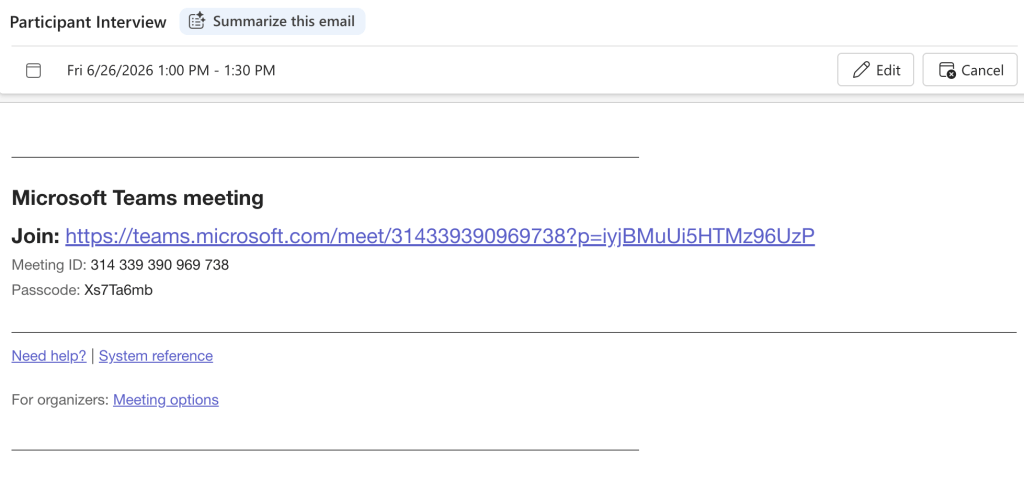
Click the Join link to join the meeting.
This is what the meeting’s waiting room will look like.

Under the Microsoft Team Meeting title, you will see a box where you can type your name.
Please write your project username (example: R3 or R4) here.

You will have signed the consent form to be recorded. It is up to you whether to have your camera on for the meetings.
To start the video, click the little camera button at the bottom left. If you do not want your camera on, simply leave the button unclicked, and only a black screen will appear.

Audio settings are in the top-right corner. Here you can select to use your computer speakers or any built-in speakers/microphone you have set up.
Once you are ready, hit the Join now button!
